Trust
Your connection routes through hardware you own rather than a VPN company's servers, and nothing in our system records what you connect to. There is no browsing history for us to log or sell, because there is nowhere for it to go.
Periscope routes your traffic through your own home network instead of a rented data center. You keep one device running there — an Apple TV, a Mac or a PC — and everything you travel with connects back to it.
Not a menu of countries. One exit — your own front door — and everything that follows from it.
Your connection routes through hardware you own rather than a VPN company's servers, and nothing in our system records what you connect to. There is no browsing history for us to log or sell, because there is nowhere for it to go.
WireGuard's cryptography — Curve25519, ChaCha20-Poly1305 — end to end between your device and your home, so a shared network sees encrypted packets and nothing more. How it works, in detail.

Use your trusted home connection while traveling, with smart fallback for difficult hotel, airport, and office networks.
No servers to rent, no settings to puzzle over. Three steps and you're connected.
Create an account, then install Periscope on the Apple TV in your living room — or on a Mac or Windows desktop that stays home. That device is what your other devices connect back to.
Add Periscope to any laptop, tablet, or phone you take on the road and sign in with the same account.
Periscope opens a secure tunnel to your home. Your apps use that protected home connection wherever you are.


Reach personal accounts, home resources, and familiar local services while respecting each service's own location and account rules.
Connect through your own home network so personal services and local accounts see a familiar connection.
Stay protected on public Wi-Fi and keep Periscope connected through smart direct, NAT traversal, or relay paths.
Use a familiar home connection for banks, work tools, and local services that may challenge unusual travel networks.
Third-party apps and subscriptions may still apply their own location, licensing, and account restrictions.
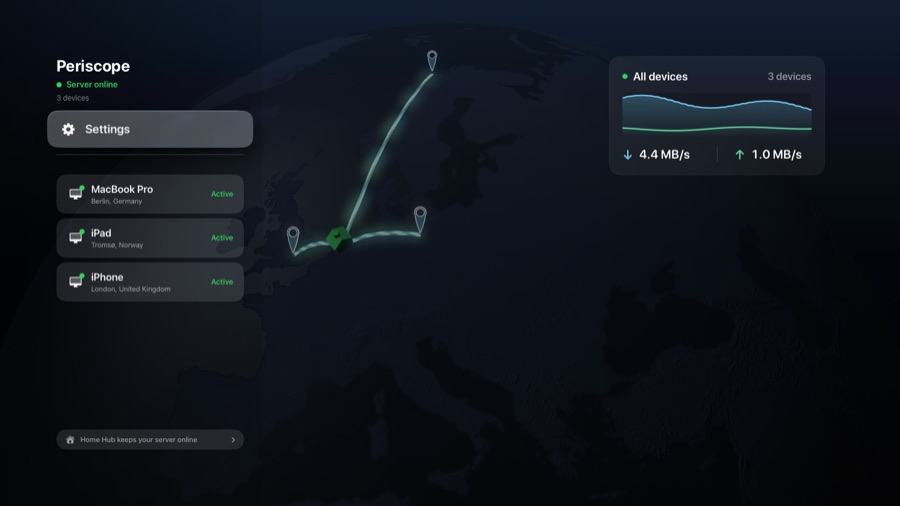
Periscope's tvOS app turns an Apple TV into your home's tunnel endpoint, so nothing else has to stay switched on.
The Apple TV is already on and drawing almost nothing. No desktop humming away in a spare room just to keep a tunnel open.
Install it, choose "Server" on the first screen, pair your phone. No admin console, no config files, no network settings to learn.
It's the same app and the same subscription as your other devices — and if a Mac or PC is already your server, nothing changes. The Apple TV is another option, not a replacement.
Requires tvOS 17 or later. To keep serving while idle, the Apple TV needs to be a home hub — assign it a room on the Apple TV itself, under Settings → AirPlay and Apple Home → Room (named AirPlay and HomeKit on tvOS 17). Most already are, and the app walks you through it.
One simple plan. Cancel any time.


or $2/month · billed through your account
Everything Periscope does, on every device you own.
Relay is only used when a direct connection isn't possible — on most networks you'll never touch the allowance. Subject to our fair use policy.


A tailored setup for your company — let's design a plan that's right for your team.
Set up an Apple TV — or a Mac or Windows desktop — at home as the server, then connect from iPhone, iPad, Mac, or Windows while you travel.
Start from the App Store on the device you take with you.

 Scan to open Periscope in the App Store.
Open the App Store on your Apple TV and search for Periscope, then choose "Server" on the first screen.
Already subscribed? The Apple TV app is the same purchase — nothing more to buy.
tvOS 17+. Apps install from the Apple TV itself — this link opens the listing.
Install on the desktop that stays home, or on the laptop you use to connect back to it.